Anayil Panel Knowledge Base
Official technical documentation, step-by-step sysadmin runbooks, and high-performance server best practices.
Coordinate DNSSEC and DS records without disrupting a domain
Avoid breaking the DNSSEC chain of trust when changing providers, keys or delegation.
Coordinate DNSSEC and DS records without disrupting a domain
Avoid breaking the DNSSEC chain of trust when changing providers, keys or delegation.
Most searched topics
Account and secure access
Guides for sign-in, sessions, passwords and multi-factor authentication.
Guides based on real features
Documentation must match features available in Anayil.
Help across the ecosystem
Panel, Hosting, Web and Services in one knowledge center.
What do you need help with?
Choose the right area. Each answer has one primary guide, with links when a topic affects more than one service.
Anayil Panel
Panel access, account, security and administration, based on available features.
Anayil Hosting
Guidance on hosting, plans, domains and operating subscribed services.
View Anayil catalogue →Anayil Web
Guides to create, publish and maintain your project’s web presence.
View Anayil catalogue →Anayil Services
Help requesting support and understanding Anayil services.
Contact support →SEO and search visibility, explained step by step
26 guides on search intent, content, technical SEO, performance, local presence and measurement. Search engines determine rankings, which cannot be guaranteed.
Explore SEO guidesDocumentation categories by product area
Choose the product related to your question and browse its guides.
All Topics
All Topics
Index of Anayil help areas. Each entry shows its review status.
Search for an answer
Enter the error, service or task you need help with.
Go to searchExplore featured guides
Browse selected procedures for Panel, Hosting, Web and Services.
View selectionAnayil Toolbox
Open free tools to check DNS, SSL, connectivity and more.
Open toolsAnayil Panel
Find guides for signing in to Anayil Panel and managing your account: sessions, preferences, authentication and control-plane permissions. The guides distinguish these features from server and website administration, which is documented only when it is available and verified for your account.
Troubleshooting
Guidance for identifying issues and collecting useful information before making changes.
Install/Upgrade
Preparation, compatibility and maintenance, with procedures to be confirmed for each version.
Security
Account security and best practices. Firewall and server controls will be documented when available.
Anayil Panel Features
Verified account and preference features. Server tools will be marked pending when they are not available.
Dashboard
Account navigation and summary. CPU, memory and hosting metrics are not connected.
User
Control-plane accounts, sessions, authentication and roles. Hosting-resource permissions are not included.
Anayil Hosting
This area explains hosting types, domains and related services, and helps you find the details to check before ordering or making changes. Resources, limits, prices and tools depend on the product and plan; always confirm what your subscription includes.
Website
Guidance for publishing and maintaining websites. Domains have a dedicated area for registration and management.
Backups
Data protection and recovery concepts; backup features must be confirmed for each service.
Database
The distinction between Anayil's control-plane database and customer databases; customer database hosting is not configured in the panel.
Managing SSL
Certificate and HTTPS concepts. Issuance and renewal through Anayil Panel are not configured.
DNS
DNS concepts and troubleshooting. Zone management in Anayil Panel is not configured.
Email concepts and troubleshooting. Mailbox management in Anayil Panel is not configured.
FTP
Secure file transfer and its variants. FTP/SFTP accounts are not implemented in the panel.
Containerization
Container and resource-usage concepts. Hosting isolation and limits are not configured.
Docker Apps
Docker and container concepts. Docker application management is not implemented in the panel.
Domains
Domain registration, transfer, renewal, ownership and cancellation. Options and timelines depend on the extension and registrar.
Hosting Panels and Packages
Access, setup, migration and lifecycle guidance for Linux/cPanel, Windows/Plesk and legacy packages. Screens and features depend on the subscribed provider.
Linux VPS and Storage
Guides to VPS KVM access, private networking, block storage, SSH keys and server maintenance.
Website Builder
Service setup, publishing and domain connection for visual website-building tools.
Explore Hosting services
Review hosting options and find the right service.
Open cataloguePrepare a DNS change
Review delegation, records and checks before changing a DNS zone.
View DNS guidesAnayil Web
Find guidance for creating, publishing and maintaining a web presence, including WordPress topics. Guides explain concepts in clear steps and identify actions that depend on the provider or on a feature not yet available in Anayil Panel.
WordPress Manager
Guidance about WordPress and hosting. Panel-specific features are pending verification.
SEO and search visibility
Guides to search intent, content, crawling, indexing, performance, local SEO and measurement. No guaranteed ranking promises.
Web Performance Optimisation (WPO)
Technical guides to diagnose latency, browser resources, cache policies, CDNs, PHP, queries and performance regressions.
AI and Local Automation
Guides for local models, AI APIs, RAG, webhooks, secure workflows, privacy and reliable operations.
APIs, integrations and webhooks
Design and troubleshoot HTTP integrations with secure authentication, response validation and reliable error handling.
Improve organic visibility
Learn to improve content, indexing, performance and SEO measurement.
Explore SEOAnayil Services
This section helps you choose the right support channel, prepare a request and understand Anayil services. For an issue, include the service name, error message, start time and recent changes; never share passwords or private keys.
Support
Support contact channels and the information that helps describe an issue clearly.
Email Service
Guidance for mail-delivery services and SMTP settings based on the subscribed provider.
Client area
Account access, services, invoices, payments, domains and support requests in the provider portal.
Reseller area
Guidance for reselling hosting and organizing clients, packages, domains and support, depending on the subscribed platform.
Billing and payments
Orders, invoices, payment methods, renewals, refunds and billing questions from the client account.
Choosing and planning services
Compare hosting types, technical compatibility, responsibilities, resources and terms before subscribing.
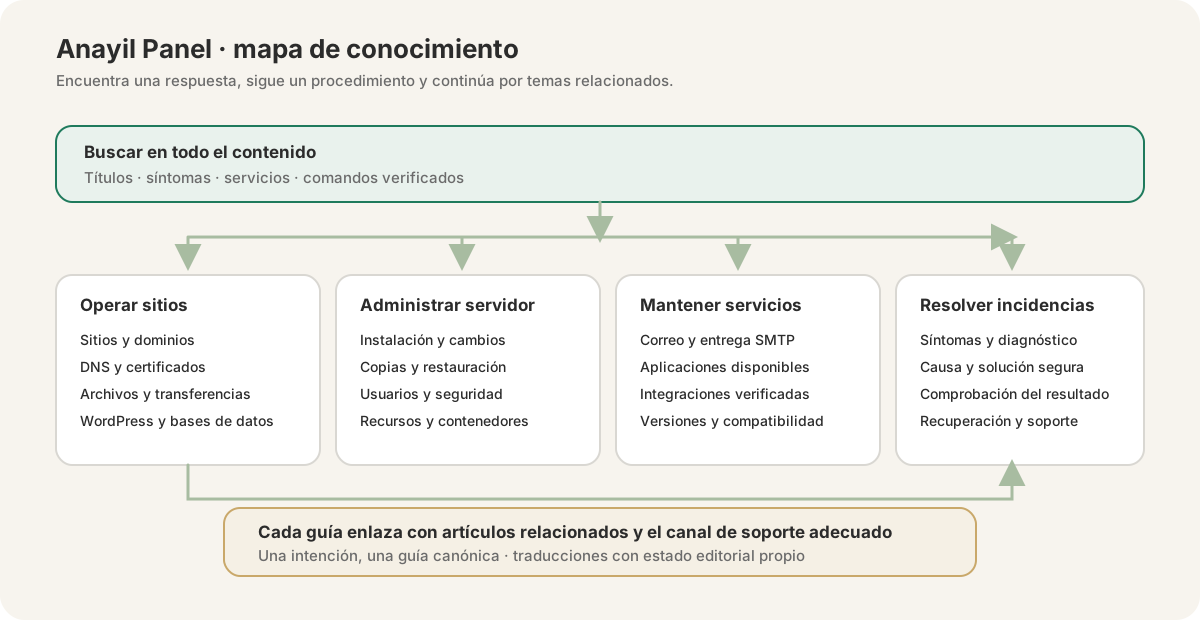
A clear path from question to resolution
Guides are grouped by task. Each procedure should have a distinct purpose, verifiable steps and links to related topics to prevent duplicate content.
Selected guides
How to Fix 500 Internal Server Error in OpenLiteSpeed
Quick resolution to 500 crashes caused by .htaccess syntax and LSPHP process memory clamps.
Coordinate DNSSEC and DS records without disrupting a domain
Avoid breaking the DNSSEC chain of trust when changing providers, keys or delegation.
How to Create a Complete Website Backup in Anayil Panel
Step-by-step guide generating a full website backup archive packaging public_html files, MySQL databases and mail accounts.
How to Deploy WordPress with LSCache Acceleration in Anayil Panel
1-Click WordPress installation with OpenLiteSpeed, isolated MySQL database provisioning and server-level LSCache configuration.
Check and resolve a domain-registration order status
Distinguish an order received, paid, submitted to the registry and a delegated domain before ordering again.
Difference between a client, reseller and server administrator
Clarify responsibilities and permissions before selling hosting or changing services.
Can’t find the answer?
Support can help with Anayil Hosting, Anayil Web and the services on your account.